
Clean Architecture in Swift
In the last post I walked the whole zoo of iOS architecture patterns and finished with the stack I actually reach for: MVVM-C for the screens, clean-style layers underneath, use cases for the business logic, the repository pattern for data, a coordinator for navigation, and tests running through the middle of all of it.
That's the theory. This is the practice.
Popcorn is an app I build: a SwiftUI app for browsing movies and TV across iOS, macOS and visionOS, backed by TMDb. It's the place I get to build the way I'd build if nobody was watching the clock, so it's the cleanest illustration I have of what that stack looks like once it's real code. The rest of this post is a tour of how it's put together, and why.
Architecture isn't a folder structure
Here's the thing most "clean architecture" tutorials get wrong. They show you a folder called Domain, a folder called Data, a folder called Presentation, and call it a day. But folders don't enforce anything. Nothing stops a view from reaching straight into the database. The diagram says the dependencies point inward; the code does whatever the developer was in the mood for that afternoon.
Clean architecture isn't a folder structure. It's a dependency graph: a set of rules about who's allowed to know about whom. And the most reliable way I've found to enforce those rules is to stop relying on discipline and make every boundary a separate Swift package.
Once a layer is its own package, it has an explicit list of what it's allowed to import. A view in Popcorn physically cannot call the TMDb SDK, because TMDb isn't in its dependency graph. It won't compile. The architecture stops being a guideline you maintain by willpower and becomes something the compiler checks for you on every build. The compiler is the architecture police, and it never gets tired or takes a shortcut on a Friday.
That wall isn't unbreakable. Nothing physically stops someone adding a dependency to a package's manifest. But that's the whole point: crossing a boundary stops being a one-line import you type on autopilot and becomes a deliberate edit to a Package.swift, sitting right there in the diff for a reviewer to question. You can still do the wrong thing. You just can't do it by accident.
Two kinds of module
Popcorn is split into two kinds of vertical building block, and keeping them separate is the first big decision. (Two horizontal foundations sit underneath both, and I'll get to those near the end.)
Contexts are the business domains: PopcornMovies, PopcornTVSeries, PopcornPeople, PopcornSearch and so on. A context knows everything about movies as a concept: what a movie is, how to fetch one, how to cache it. It knows nothing about screens, navigation or pixels. This is the domain-driven design idea of a bounded context: a self-contained slice of the problem, with a hard edge around it.
Features are the UI vertical slices: MovieDetailsFeature, ExploreFeature, WatchlistFeature. A feature is a screen (or a small cluster of them): a view, a view model, the state it shows. It knows everything about presentation and nothing about where the data comes from.
That split is the whole game. The business rules don't depend on the UI, and the UI doesn't depend on the plumbing. Each is a Swift package; each can be built, tested and reasoned about on its own.
Here's the whole thing on one page. The rest of the post is a walk through it, one band at a time.
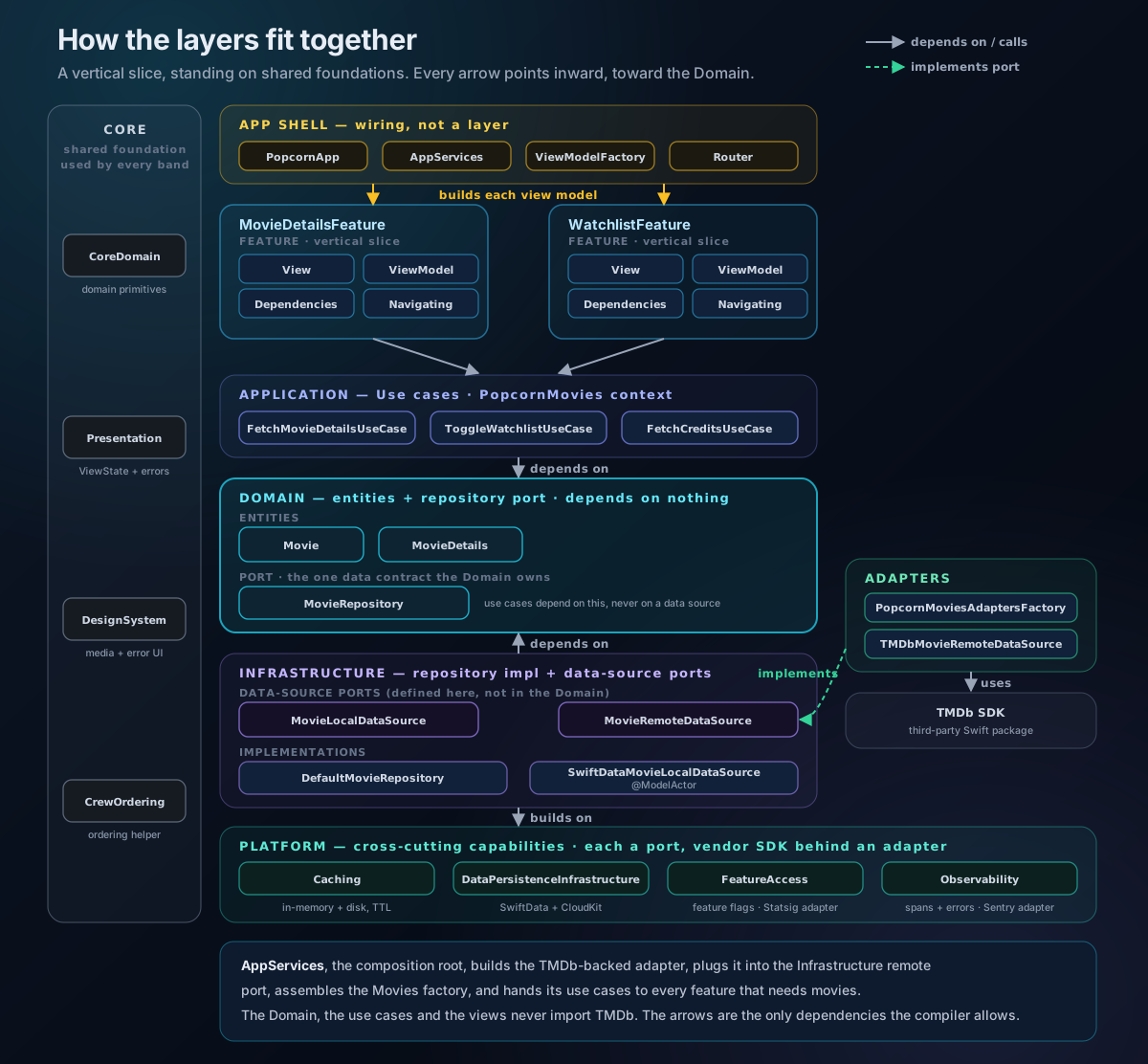
The dependency rule, made physical
Inside a context, the layers are also separate targets. PopcornMovies is one package with four:
Contexts/PopcornMovies/Sources/
├── MoviesDomain/          # Pure business logic, depends on NOTHING
├── MoviesApplication/     # Use cases, depends on Domain
├── MoviesInfrastructure/  # Data sources, depends on Domain
└── MoviesComposition/     # Wiring, depends on all of the above
The dependency rule says the arrows point inward, toward the domain. Because each layer is a target with a declared dependency list, that rule isn't a convention. It's enforced. MoviesDomain can't import MoviesInfrastructure even if you wanted it to, because the dependency only runs the other way. Try it and the build fails.
The domain layer is the centre, and it depends on nothing at all. It's just types and protocols, the vocabulary of the domain:
public struct Movie: Identifiable, Equatable, Sendable {
    public let id: Int
    public let title: String
    public let overview: String
    public let releaseDate: Date?
}

public protocol MovieRepository: Sendable {
    func movie(withID id: Int) async throws(MovieRepositoryError) -> Movie
}
Notice the repository is a protocol here, in the domain. The domain says "something will give me a movie by ID" without having the faintest idea whether that something is a network call, a SwiftData cache, or a hard-coded stub in a test. It owns the contract; somebody on the outside fulfils it.
Use cases: one verb each
The application layer turns those contracts into use cases. A use case is one unit of business intent, one verb. FetchMovieDetails. ToggleWatchlistMovie. Each gets its own protocol, its own implementation, its own error type, in its own little folder.
public protocol FetchMovieDetailsUseCase: Sendable {
    func execute(id: Movie.ID) async throws(FetchMovieDetailsError) -> MovieDetails
}

final class DefaultFetchMovieDetailsUseCase: FetchMovieDetailsUseCase {
    private let movieRepository: any MovieRepository

    func execute(id: Movie.ID) async throws(FetchMovieDetailsError) -> MovieDetails {
        let movie = try await movieRepository.movie(withID: id)
        return MovieDetailsMapper().map(movie)
    }
}
It reads like a sentence. It depends only on a protocol from the domain. To test it, you hand it a fake repository and check what it does. No network, no database, no simulator. That's the payoff of pointing every dependency at an interface instead of a concrete thing.
(One aside on the syntax: throws(FetchMovieDetailsError) is Swift 6's typed throws. The function declares exactly which error type it can throw, so a caller handles one known case instead of an opaque Error. Popcorn uses it throughout.)
Ports and adapters: TMDb stays in its lane
Popcorn gets its data from TMDb, which means a third-party SDK is somewhere in the mix. The discipline is making sure "somewhere" is exactly one place.
A quick word on that contract from earlier, because it has a name. A port is just a protocol the inside owns and the outside has to implement: the inside declares what it needs, an outer layer decides how. MovieRepository is one.
The repository is the port the domain owns, but the repository still has to get its data from somewhere concrete. That somewhere is described by a second, lower-level port: a data-source protocol. The quick way to keep the two straight is that the repository is what the app asks for ("give me a movie"), while the data source is where a single byte actually comes from (the network, the cache). And this lower-level port deliberately lives in the Infrastructure layer, not the Domain. The split into remote and local, the existence of a network or a cache, is a how-detail the domain has no business knowing about:
// Defined in MoviesInfrastructure, not the Domain
public protocol MovieRemoteDataSource: Sendable {
    func movie(withID id: Int) async throws(MovieRemoteDataSourceError) -> Movie
}
The TMDb SDK is then only ever touched in a completely separate Adapters package, which implements that port and maps the SDK's types into domain types:
// In PopcornMoviesAdapters: the only place the movie code touches TMDb
final class TMDbMovieRemoteDataSource: MovieRemoteDataSource {
    private let movieService: any TMDb.MovieService

    func movie(withID id: Int) async throws(MovieRemoteDataSourceError) -> Movie {
        do {
            let dto = try await movieService.details(forMovie: id)
            return MovieMapper().map(dto)   // TMDb type → domain Movie
        } catch let error as TMDbError {
            throw error.toDataSourceError()
        }
    }
}
The adapter depends on that Infrastructure port (an outer ring depending on an inner one, so the arrow still points the right way), and TMDb is now sealed in the adapter ring with a thick wall around it. The domain, the use cases, the view models: none of them have ever heard of it.
If TMDb shut down tomorrow, I'd swap it out by writing new adapters that satisfy the same ports and rewiring the bits that hand them in. For the movie data, that's one adapter and one line. For the whole of TMDb it's one adapter per port it fills, because a movie database that also serves TV, people and search is really several ports wearing one brand. That sounds like a lot, and it isn't free, but notice where the work lands: every one of those edits is a leaf adapter doing the same mechanical job, and I can migrate one context at a time. Nothing inside the core changes, because nothing inside the core ever named TMDb. That's the real promise of ports and adapters. Not that swapping a vendor is free, but that the cost is bounded to the adapter ring and never leaks inward. The only way to guarantee that is to keep the SDK a dependency of the adapter packages and nothing else.
Repository: caching the view model never sees
The repository sits between the use case and the data sources and coordinates them. In Popcorn that means checking a local SwiftData cache before going to the network:
final class DefaultMovieRepository: MovieRepository {
    private let remoteDataSource: any MovieRemoteDataSource
    private let localDataSource: any MovieLocalDataSource

    func movie(withID id: Int) async throws(MovieRepositoryError) -> Movie {
        if let cached = try await localDataSource.movie(withID: id) {
            return cached
        }
        let movie = try await remoteDataSource.movie(withID: id)
        try await localDataSource.setMovie(movie)
        return movie
    }
}
The cache exists, it works, and not a single line of view model or UI code knows it's there. Caching is a data-layer concern, so it lives in the data layer. (The local data source is a SwiftData-backed actor, which keeps all that mutable persistence neatly serialised, but that's a post of its own.)
Wiring it up without a DI framework
All these pieces need assembling, and Popcorn does it with plain Swift. No dependency-injection framework, no global registry, no magic. There's a single composition root, AppServices, that builds the whole graph once at launch, in dependency order:
public final class AppServices: Sendable {
    public let moviesFactory: PopcornMoviesFactory
    public let featureFlags: any FeatureFlagging
    // ...built once, in order, at startup
}
Features don't reach into that graph directly. Each feature declares a Dependencies struct, a Sendable bag of closures describing exactly what it needs and nothing more:
public struct MovieDetailsDependencies: Sendable {
    public var fetchMovie: @Sendable (_ id: Int) async throws -> Movie
    public var toggleOnWatchlist: @Sendable (_ id: Int) async throws -> Void
    public var isWatchlistEnabled: @Sendable () throws -> Bool
}

public extension MovieDetailsDependencies {
    static func live(services: AppServices) -> MovieDetailsDependencies {
        let fetchMovieDetails = services.moviesFactory.makeFetchMovieDetailsUseCase()
        return MovieDetailsDependencies(
            fetchMovie: { id in MovieMapper().map(try await fetchMovieDetails.execute(id: id)) },
            // ...
        )
    }
}
I like this for one stubborn reason: a missing dependency is a compile error. You can't construct the struct without supplying every closure, so the day I add a new thing the screen needs, the compiler walks me to every place I forgot to wire it up. And because the whole surface is just closures, the preview version for SwiftUI previews and snapshot tests is a handful of stubs. No framework, no mocking library, no ceremony.
The view model just holds a ViewState
With all that underneath, the feature layer gets to be boring, which is exactly what you want from the part that changes most often. Every view model is an @Observable @MainActor class exposing one thing: a ViewState with four cases: .initial, .loading, .ready(content), .error:
@Observable @MainActor
public final class MovieDetailsViewModel {
    public private(set) var viewState: ViewState<ViewSnapshot> = .initial
    private let dependencies: MovieDetailsDependencies

    public func load() async {
        guard !viewState.isReady, !viewState.isLoading else { return }
        viewState = .loading
        do {
            let movie = try await dependencies.fetchMovie(movieID)
            viewState = .ready(ViewSnapshot(movie: movie))
        } catch {
            viewState.applyLoadFailure(error)
        }
    }
}
The view switches on those four cases and drives load() from a .task(id:), so SwiftUI handles cancellation and reloading for free. The view model never fetches from the network, never touches a cache, never knows what a route is. It calls a closure and turns the result into state. That's the entire job.
Navigation lives in the app, not the feature
The last piece is keeping navigation out of the features. A feature that knows how to push the next screen knows about that screen, and now your "independent" modules are quietly tangled together.
So each feature declares only a *Navigating protocol, the things it might want to do, and stays route-agnostic:
@MainActor
public protocol MovieDetailsNavigating {
    func openPersonDetails(id: Int)
    func openMovieCastAndCrew(movieID: Int)
}
The App layer owns the actual routes and routers, and provides something that implements that protocol by mutating a navigation stack. MovieDetailsFeature can be dropped into any tab, or into a preview, or into a test, with a different navigator behind it each time. It has no idea where "open person details" actually goes, and that's the point.
When one context needs another's data
Sooner or later a context needs something another context owns. Popcorn's Intelligence context (the AI features) needs to know about a movie, and movies live in the Movies context. So how does one domain reach into another?
The same way it reaches anything external: it doesn't. It declares a port and waits for someone to fill it.
Here's the move that keeps it honest. The Intelligence context defines the port in its own domain, in its own vocabulary:
// In IntelligenceDomain, owned by the context that needs the data
public protocol MovieProviding: Sendable {
    func movie(withID id: Int) async throws(MovieProviderError) -> Movie
}
That Movie is Intelligence's own Movie, not the Movies context's Movie. The two contexts never share a type. Intelligence has no idea the Movies context exists; it only knows it needs "something that can hand me a movie."
The bridge is an adapter, in exactly the place you'd expect: Intelligence's adapters package. It implements MovieProviding by calling the Movies context's use case and mapping the result across the boundary:
// In PopcornIntelligenceAdapters: depends on MoviesApplication, maps across the seam
final class MovieProviderAdapter: MovieProviding {
    private let fetchMovieDetails: any FetchMovieDetailsUseCase

    func movie(withID id: Int) async throws(MovieProviderError) -> Movie {
        do {
            let details = try await fetchMovieDetails.execute(id: id)
            return MovieMapper().map(details)   // Movies' MovieDetails → Intelligence's Movie
        } catch {
            throw MovieProviderError(error)
        }
    }
}
Then the composition root wires it like everything else: it hands the Movies use case into the adapter, and the adapter into the Intelligence factory.
If that shape looks familiar, it should. It's the TMDb story again, beat for beat: a port the inside owns, an adapter on the outside that fulfils it, a mapper translating foreign types into local ones. "Another domain" turns out to be just another outside world, and the rule for the outside world never changes. Define a port, write an adapter, and never let the two sides learn each other's types. In domain-driven design this is called an anti-corruption layer, and it's the thing that stops a dozen contexts congealing into one big ball of mud the first time two of them need to talk.
The two foundations: Core and Platform
Everything so far has been one vertical slice: a feature on top, a context underneath, top to bottom. But a slice doesn't stand on its own. Two more module families hold the whole thing up, and they run the other way: horizontal, shared sideways across every slice.
Core is the shared kernel. Three packages do most of the work. CoreDomain holds the domain primitives that more than one context needs: small types like ImageURLSet, Gender and ThemeColor, plus a few cross-cutting protocols. It's so foundational, and so deliberately dependency-free, that even the context Domain layers sit on top of it. Presentation holds ViewState, the four-case state machine every view model exposes. DesignSystem holds the reusable SwiftUI: poster and backdrop rows, carousels, the loading and error views. Without Core, every context would redefine Gender, and every feature would reinvent its own loading spinner and poster row. Core is how I stay DRY across twenty features without them reaching into each other.
Platform is the cross-cutting plumbing: caching, persistence, feature flags, observability. The trick is that these follow exactly the same ports-and-adapters discipline as TMDb. Each one is a protocol, Caching, FeatureFlagging, Observing, and the vendor SDK that fulfils it lives behind an adapter. Statsig sits behind the FeatureFlagging port; Sentry sits behind the Observing port; SwiftData and CloudKit sit behind the persistence package. So a view model asks services.featureFlags.isEnabled(.watchlist) and never imports Statsig, and an infrastructure layer caches through the Caching port without knowing whether the cache is in memory or on disk.
That's the symmetry I like most about this layout. Contexts and Features are vertical: a product capability, sliced top to bottom. Core and Platform are horizontal: one concern, shared across every slice. It's the same package-boundary rule throughout, just rotated ninety degrees.
What it buys, and what it costs
I won't pretend this is free. There's real scaffolding here: more packages, more protocols, more wiring than throwing a URLSession call into a view model and shipping it. (I lean on a few code-generation scripts to spit out the boilerplate when I add a context or a feature, precisely because there's a lot of it.)
The cost that actually shows up day to day is build time. A dozen contexts at four targets each, twenty-odd features, the adapters, Core and Platform: that's well over a hundred Swift targets, and a cold build feels every one of them, as does Xcode's indexer. What makes it bearable is that the boundaries enforcing the architecture also scope the rebuilds. Change one feature and you recompile that package, not the world, so most of the day I'm building a single package rather than the whole app.
Managing the project itself becomes its own problem at this scale, and it's one every large modular codebase runs into. A hundred-odd targets is more than anyone wants to wire up by hand, and a shared Xcode project file turns every merge into a .pbxproj knife fight. The usual solution is Tuist: you describe the project in Swift (Project.swift) instead of clicking through Xcode, generate the .xcodeproj on demand with tuist generate, and lean on its target caching to skip rebuilding modules that haven't changed. Configuration as code, reviewable in a diff, with the project file no longer something you merge. It isn't free either: the generated project isn't the source of truth, so tuist generate becomes a reflex you run after every pull, branch switch and manifest change, and the time you forget is the time Xcode hands you a stale graph and you lose ten minutes working out why. Past a certain module count it's still the better trade, but it is a trade.
And you don't need any of this on day one. For a weekend prototype it would be madness. Start with one context and one feature, and only promote a boundary to its own package when the pain of not having it actually shows up. The shape in this post is where Popcorn ended up as it grew, not where it started.
But for an app I want to keep working on for years, the trade pays off every single week:
- Every layer is testable in isolation. Use cases with fake repositories, view models with stub closures, mappers with literal inputs. No simulator in the loop.
- The boundaries are real. Not a diagram on a wiki that's quietly drifted out of date, but a dependency graph the compiler re-checks on every build.
- Things are swappable. TMDb, the cache, the analytics SDK: each lives behind a port in its own package, replaceable without touching the core.
- Work parallelises. Because a feature and a context are genuinely independent, you can build one without holding the whole app in your head.
A good architecture, I said last time, is like a well-run building site: every trade knows their role and nothing gets mixed up. The bit I'd add now is that on a real site, the rules are physical. You can't run plumbing through a wall that hasn't been built, no matter how convenient it'd be. Make your boundaries packages, and your architecture gets the same property: not a rule you remember to follow, but one the structure won't let you break.
Popcorn is on GitHub if you'd like to poke around the real thing: github.com/adamayoung/popcorn.